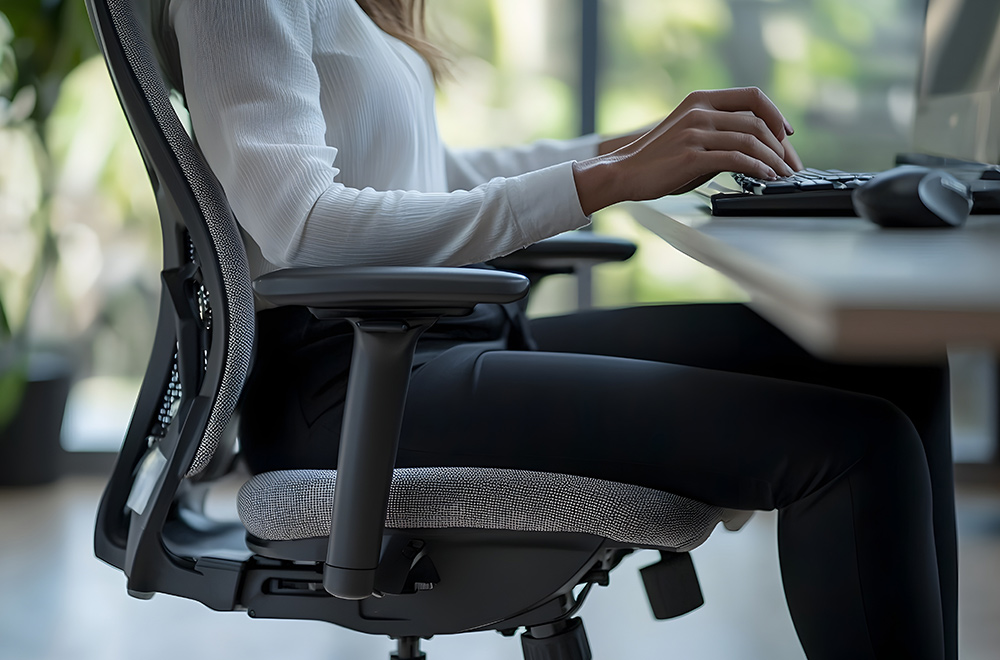
If you've been dealing with neck or back pain at work, there's a good chance you've already tried changing something about your desk.
Maybe you purchased an ergonomic chair, raised your monitor, added lumbar support, or invested in a standing desk because you were tired of feeling stiff and uncomfortable by the afternoon.
And maybe those changes helped.
But what happens when you've made all the recommended adjustments and your neck still feels tight at three o'clock? What if your lower back continues bothering you during meetings, or you find yourself constantly shifting positions because you can't get comfortable?
Does that mean you need an even better chair?
Not necessarily.
I see this situation with professionals who spend much of their day working at computers. They understand that their workstation matters, and they're willing to make changes, but they're frustrated because the discomfort keeps returning.
Here's what I want you to understand: office ergonomics can help make your working environment more comfortable, but even a well-designed workstation cannot address every reason someone experiences recurring neck or back pain.
Your chair matters. Your monitor matters. The position of your keyboard and mouse matters.
But so does how long you remain in one position, how frequently you move, your physical activity outside the office, and whether there's an underlying musculoskeletal problem contributing to your symptoms.
That's why I prefer looking at the person and their entire workday rather than assuming the solution is always another piece of office equipment.
What Office Ergonomics Actually Means
The word ergonomics gets used so frequently in office furniture advertising that it's easy to forget what it actually means.
At its simplest, ergonomics is about designing and arranging your work environment to fit the person doing the work.
Instead of expecting everyone to adapt to the same desk, chair, and computer arrangement, the idea is to adjust the equipment and working conditions so people can perform their tasks more comfortably and efficiently.
That might involve positioning a monitor where you can see it without constantly turning your head, adjusting your chair so your feet are supported, or moving your keyboard closer so you aren't repeatedly reaching forward.
None of those adjustments is particularly complicated, and many don't require buying anything.
In fact, the Occupational Safety and Health Administration's workstation guidance emphasizes that there isn't one correct arrangement that fits every worker. The goal is to create a setup that accommodates individual needs while reducing unnecessary physical demands.
I think that's an important distinction.
Ergonomics isn't about forcing every employee into the same supposedly perfect posture. It's about making the workstation work better for the person using it.
And if you've been uncomfortable at your desk for months, understanding that difference is a good place to start.
Is an Ergonomic Chair the Solution?
When people start researching office ergonomics for back pain, the chair is often the first thing they focus on.
That makes sense. If you're spending a significant part of your day sitting, you want something comfortable and supportive.
A good office chair should allow you to adjust your position, support your back, and sit with your feet comfortably supported. Ideally, it should also give you enough freedom to change positions without feeling restricted.
But there's a problem with the way ergonomic chairs are sometimes marketed.
The implication is that if you purchase the right chair, your back pain will disappear.
I wish it were that simple.
Two people can sit in identical chairs for the same amount of time and have completely different experiences. One may feel comfortable throughout the day, while the other develops recurring stiffness or lower back discomfort.
That's because a chair is only one part of the situation.
Previous injuries, physical conditioning, the type of work someone performs, how frequently they move, and other individual factors can all influence their symptoms.
I've discussed this in my article about why your lower back hurts after sitting at work, particularly why prolonged sitting shouldn't automatically be treated as a diagnosis.
If your chair is uncomfortable, adjusting or replacing it may be worthwhile. But if your back continues bothering you regardless of where you sit, I wouldn't keep assuming the furniture is the entire problem.
How to Set Up Your Desk for Better Neck and Back Comfort
Although I don't believe office ergonomics solves every musculoskeletal problem, I absolutely believe a poorly arranged workstation can make an already demanding workday more uncomfortable.
The good news is that many useful changes are straightforward.
You don't need to turn your office into an expensive showroom or purchase every ergonomic accessory being advertised online.
Start with the equipment you use most frequently and consider whether its position allows you to work comfortably without repeatedly reaching, twisting, or straining.
Position Your Monitor Where You Can See It Comfortably
Your monitor should generally be positioned directly in front of you, at a distance where you can read the screen clearly without leaning forward.
For many people, placing the top of the screen around eye level or slightly below provides a reasonable starting point, although screen size, vision needs, and individual comfort can change the ideal arrangement.
If your monitor is too low, you may find yourself repeatedly looking downward. If it's too high, you may spend long periods tilting your head backward.
And if your primary monitor is positioned off to one side, you may repeatedly turn your head in the same direction throughout the day.
Those adjustments matter because they can reduce unnecessary demands on your neck and shoulders.
However, I don't want you thinking that looking down at a screen automatically damages your spine. The relationship between posture and pain is more complicated than that.
What we're trying to accomplish is a comfortable arrangement that allows you to work without repeatedly forcing yourself into awkward positions.
Keep Your Keyboard and Mouse Within Easy Reach
Your keyboard and mouse should be positioned where your arms can rest comfortably without constantly reaching forward or out to the side.
If your keyboard is too far away, you may lean toward the desk throughout the day. If your mouse sits several inches beyond your natural reach, your shoulder may spend hours working in a position that feels increasingly uncomfortable.
Ideally, your shoulders should remain relaxed, your elbows should be relatively close to your body, and your wrists should be able to stay in a comfortable position while typing.
You may need to adjust your chair height, keyboard placement, or desk arrangement to accomplish that.
OSHA's guidance specifically addresses keyboard height, reaching distance, and wrist positioning because these factors can influence how much physical effort is required during repetitive computer work.
The goal isn't to hold your arms perfectly still.
It's to arrange the equipment so normal computer use doesn't require unnecessary effort.
Adjust Your Chair to Support You, Not Restrict You
When you're sitting, your chair should provide reasonable support without forcing you into one rigid position.
Your feet should rest comfortably on the floor or a footrest. Your thighs should have adequate support, and you should be able to sit without the front edge of the chair creating uncomfortable pressure behind your knees.
Your backrest should allow you to sit comfortably, whether you prefer a more upright position for certain tasks or a slightly reclined position while reading.
If the armrests prevent you from getting close enough to your desk, they may need adjustment. If the chair is too high for your feet to reach the floor comfortably, a footrest may help.
These details can make a noticeable difference in how your workstation feels.
But here's something I want you to remember: you don't need to maintain the exact same sitting position throughout the day to benefit from a supportive chair.
A comfortable chair should make it easier to work and change positions, not make you afraid to move.
Make Sure Your Desk Gives You Room to Work
Sometimes the problem isn't the chair or monitor. It's the desk itself.
If your work surface is too high, you may find yourself raising your shoulders to reach the keyboard. If it's too low, you may constantly lean forward.
A cluttered desk can also force your mouse, keyboard, documents, or other equipment into positions that require repeated reaching or twisting.
Take a look at the space underneath your desk as well.
If boxes, computer equipment, or storage containers are limiting where you can place your legs, you may be sitting in an awkward position simply because you don't have enough room.
Your desk should accommodate your body and the equipment you use, not require you to work around unnecessary obstacles.
These are the kinds of practical adjustments I recommend considering before spending money on additional accessories.
The Problem With Trying to Maintain Perfect Posture
One of the biggest misconceptions about office ergonomics is that there's a single correct sitting position everyone should maintain.
You've probably heard the familiar instructions.
Sit up straight. Pull your shoulders back. Keep your head directly over your spine. Don't slouch.
Some of those cues can help someone recognize an uncomfortable or awkward working position, but they can also create the impression that any deviation from an ideal posture is harmful.
I don't believe that's a useful way to approach an entire workday.
Your body is capable of sitting upright, leaning back, turning, bending, and moving between different positions. Those are normal activities.
The difficulty comes when someone tries to hold one position for hours, especially if that position is uncomfortable for them.
You can sit with textbook posture and still develop discomfort. You can also sit in a relaxed position without experiencing any symptoms.
That's why I prefer thinking about posture as something that should change throughout the day rather than a position you're supposed to maintain perfectly.
In my article on neck pain from sitting at a desk, I explain why sustained computer work can be uncomfortable even when someone has invested in a reasonable workstation.
The goal isn't to spend your day constantly correcting yourself.
It's to find comfortable working positions, make sensible adjustments, and allow your body to move.
Standing Desks Are Useful, But They Aren't a Cure
Standing desks have become increasingly popular, particularly among professionals who spend much of their day working at computers.
And I can understand the appeal.
If you're uncomfortable sitting for long periods, having the option to stand while working can provide a welcome change.
But I think standing desks are sometimes presented as though standing is automatically healthy and sitting is automatically harmful.
That's an oversimplification.
Standing in one place for an extended period can become uncomfortable too, particularly if you're already dealing with lower back pain, leg discomfort, or another musculoskeletal problem.
A standing desk doesn't eliminate the need to move.
What makes an adjustable desk potentially useful is that it gives you more options throughout the workday.
You can sit while working on a detailed project, stand during a phone call, and change positions when you begin feeling uncomfortable.
For some people, that flexibility can make the day easier to manage.
For others, a standing desk may not provide much relief, especially if the underlying problem hasn't been identified.
I wouldn't recommend purchasing one with the expectation that it will automatically resolve recurring neck or back pain.
Instead, think of it as another tool that may help you create a more comfortable and varied working environment.
Laptop Ergonomics: The Problem With Working From One Screen
Laptops have made it easier than ever to work from almost anywhere. You can answer emails at your kitchen table, prepare a presentation at the airport, or spend an entire afternoon working from a conference room.
That flexibility is convenient, especially for South Florida professionals who split their time between the office, home, and business travel.
But laptops introduce an ergonomic challenge that traditional desktop computers don't have.
The screen and keyboard are physically connected.
When you position the keyboard at a comfortable height for typing, the screen may be lower than you'd prefer. If you raise the laptop to bring the screen closer to eye level, the keyboard may become uncomfortable to use.
That doesn't mean laptops are inherently harmful to your neck or spine. It means they can make it more difficult to arrange your workstation comfortably during extended periods of computer use.
For occasional tasks, this may not matter very much. But if your laptop is your primary workstation for eight hours a day, it's worth considering a few adjustments.
An External Keyboard and Monitor Can Make a Difference
If you're regularly working from a laptop, one of the simplest improvements is separating the screen from the keyboard.
An external keyboard and mouse allow you to position your hands comfortably while placing the screen at a height and distance that works better for your vision and seating arrangement.
You can accomplish this with a separate monitor or by using a laptop stand alongside an external keyboard.
You don't necessarily need an elaborate setup.
What matters is being able to look at your screen without constantly leaning forward while keeping your keyboard and mouse within comfortable reach.
For someone working remotely several days a week, these adjustments may be particularly useful because home workstations are often assembled around whatever furniture happens to be available.
A dining room chair and kitchen table might work reasonably well for a short period, but they may not provide the flexibility of an adjustable workstation during longer work sessions.
The key is finding an arrangement that suits the work you're actually doing.
What About Working With Two Monitors?
Dual-monitor setups are common in finance, accounting, design, technology, and other professions where people regularly work across multiple applications.
They can be extremely useful, but the arrangement deserves some attention.
If you use one monitor for most of your work, positioning that screen directly in front of you may reduce the need to repeatedly turn your head. The secondary monitor can sit beside it at a comfortable angle.
If you use both monitors equally, placing them close together with the center of the pair in front of you may be more practical.
The important consideration is how you actually use the screens.
I wouldn't tell someone to rearrange their monitors based on a generic diagram without understanding whether they're spending most of the day looking at one screen or frequently moving between both.
Ergonomics should support the task, not make the task more complicated.
Why Your Neck or Back May Still Hurt After Fixing Your Workstation
Let's say you've made the adjustments.
Your monitor is positioned comfortably, your chair provides reasonable support, your keyboard and mouse are within easy reach, and you even alternate between sitting and standing throughout the day.
But your neck still becomes uncomfortable every afternoon.
Or your lower back continues bothering you during long meetings.
At that point, I think it's worth asking a different question.
Instead of wondering what else you need to purchase, consider whether the workstation is actually the primary issue.
Neck and back pain can involve several contributing factors. Previous injuries, physical conditioning, sleep, stress, individual sensitivity, and certain musculoskeletal conditions may influence how someone feels during the workday.
Even when an activity consistently aggravates symptoms, that doesn't necessarily mean the activity originally caused the condition.
This is why I don't believe it's helpful to diagnose someone with poor posture simply because they spend a lot of time working at a computer.
I want to understand the symptoms, the activities that reproduce them, and whether there are findings that point toward a specific problem.
My broader article on corporate spine health for South Florida professionals explores this relationship between desk work, commuting, exercise, and daily routines.
Your workstation is one part of your environment.
Your health involves considerably more than your workstation.
Movement Is the Part of Office Ergonomics People Often Overlook
When we talk about improving office ergonomics, the conversation usually centers on equipment.
Chairs, desks, monitor arms, footrests, keyboard trays, and standing desk converters tend to get most of the attention.
But one of the most practical changes doesn't necessarily require purchasing anything.
It's giving yourself more opportunities to move throughout the day.
That doesn't mean you need to stop working every fifteen minutes or perform an elaborate stretching routine in the middle of the office.
For many professionals, that simply isn't realistic.
Instead, I encourage people to look at their existing schedule and identify opportunities to change positions or walk around without disrupting their responsibilities.
Maybe you stand while taking a phone call. Perhaps you walk to speak with a coworker instead of sending another email. You might take a short walk after lunch or stand up between meetings rather than remaining in the same chair all afternoon.
These are relatively small changes, but they introduce movement into a routine that may otherwise involve long periods of sitting.
Research supports reducing prolonged sedentary time for general health, although evidence that specific movement-break schedules consistently prevent or treat neck and back pain is less certain.
I don't want to oversell the benefits.
Movement is useful, but it's not a guaranteed solution to every musculoskeletal complaint.
How Often Should You Get Up From Your Desk?
This is one of the most common questions people ask when discussing office ergonomics.
And the answer isn't as precise as some articles make it sound.
You'll find recommendations suggesting movement every twenty minutes, thirty minutes, or once an hour. These can be helpful reminders, but there isn't one universally proven interval that prevents neck or back pain for everyone.
A reasonable approach is to avoid remaining in the same position for excessively long periods when you have opportunities to move.
If you've been concentrating on a project for an extended period, stand up and walk around when you reach a natural stopping point.
If you're already uncomfortable, consider whether a brief change in position provides relief.
And if your symptoms are significant or worsening, don't assume that simply taking more breaks will resolve them.
The goal is to make movement a normal part of your workday rather than another rigid rule you have to follow.
When Office-Related Neck or Back Pain Needs an Evaluation
Most people experience occasional stiffness or discomfort, especially after an unusually demanding day.
That doesn't automatically mean something is seriously wrong.
But there's a difference between temporary discomfort and a problem that keeps returning.
If your neck hurts nearly every afternoon, your lower back regularly bothers you during meetings, or you're beginning to avoid certain activities because of your symptoms, I think it's reasonable to seek an evaluation.
The same applies if you've made sensible ergonomic adjustments but continue experiencing discomfort that interferes with your daily routine.
I'm particularly interested in symptoms that extend beyond localized stiffness.
Pain traveling into an arm or leg, persistent numbness, tingling, or noticeable weakness may suggest that something more than ordinary muscular discomfort needs attention.
New or progressive neurological weakness should be assessed promptly. Sudden bowel or bladder dysfunction, saddle numbness, or severe neurological symptoms require emergency medical evaluation.
These situations shouldn't be managed by simply purchasing a better office chair or waiting to see whether a standing desk helps.
An appropriate examination can help determine what may be contributing to the symptoms and whether chiropractic care, another treatment approach, additional testing, or medical referral is appropriate.
How I Approach Neck and Back Pain in Office Professionals
H2: How I Approach Neck and Back Pain in Office Professionals
When someone comes into my Davie office because their neck or back hurts during the workday, I don't begin by telling them their posture is wrong.
I want to know what they're experiencing.
Does the discomfort develop gradually throughout the day, or is it present when they wake up? Does it become worse while typing, driving, sitting in meetings, or using a laptop?
Are there activities that provide relief?
I'll also ask about previous injuries, physical activity, how long the symptoms have been present, and whether they're experiencing numbness, weakness, or other concerning symptoms.
That information helps guide an appropriate examination and determine what the next steps should be.
Sometimes the workstation is clearly contributing to discomfort, and relatively simple adjustments may be helpful.
Other times, the history and examination suggest that we need to look beyond ergonomics.
Not every patient requires imaging, and I don't believe every office worker with neck pain needs chiropractic treatment.
The appropriate recommendation depends on the individual.
My objective is to understand the problem, explain the findings clearly, and discuss care options that make sense for the person's condition.
For professionals living in Davie, Plantation, Weston, Sunrise, Cooper City, Pembroke Pines, and nearby Broward communities, you can learn more about my practice through my Davie chiropractic office and service area page.
Frequently Asked Questions
The best workstation is one that allows you to work comfortably without repeatedly reaching, twisting, or holding positions that aggravate your symptoms.
For many people, that means placing the primary monitor directly in front of them at a comfortable viewing distance, keeping the keyboard and mouse within easy reach, and adjusting the chair so their feet and back have appropriate support.
However, there isn't one exact setup that works for everyone.
Your height, vision, equipment, work responsibilities, and individual comfort all matter. Someone who primarily types may need a different arrangement than someone who frequently reviews printed documents or uses multiple monitors.
I also encourage people to remember that a comfortable workstation should allow them to change positions throughout the day.
If you're experiencing recurring neck pain despite reasonable ergonomic adjustments, the next step may be an appropriate evaluation rather than another equipment purchase.
An uncomfortable workstation can contribute to neck and back symptoms, particularly when it requires repeated reaching, awkward positioning, or sustained activities that aggravate an existing problem.
But I would be careful about assuming that a particular sitting position automatically causes spinal damage.
The relationship between posture, workplace activities, and pain is complex. Two people can use the same workstation and have very different experiences.
If symptoms consistently appear during certain tasks, that pattern can help identify possible contributing factors.
Ergonomic improvements may make those activities more comfortable, but persistent symptoms sometimes require a broader assessment.
A standing desk can be useful because it allows you to alternate between sitting and standing, particularly if remaining seated for long periods becomes uncomfortable.
However, standing isn't automatically better for everyone.
Some people experience lower back discomfort when standing in one place for extended periods, while others find standing more comfortable than sitting.
The benefit of an adjustable desk is flexibility, not the idea that standing is a perfect posture.
I generally encourage people to choose comfortable positions and change them as needed rather than treating sitting or standing as inherently harmful.
If either position consistently reproduces significant pain, it's worth understanding why.
For many office workers, positioning the top of the monitor around eye level or slightly below is a reasonable starting point.
The screen should also be far enough away that you can see it clearly without leaning forward, while remaining close enough that you aren't straining to read.
But these are guidelines, not absolute rules.
Someone who wears progressive lenses may prefer a lower monitor position. A person using a particularly large screen may need a different arrangement than someone working with a smaller display.
The goal is to find a comfortable viewing position that doesn't require excessive head movement or sustained awkward positioning.
And remember, even a well-positioned monitor doesn't eliminate the value of changing positions throughout the day.
There isn't one universally established break schedule that guarantees prevention of neck or back pain.
Some people find it helpful to stand or walk briefly every thirty to sixty minutes, while others prefer changing positions at natural transitions between tasks.
The important point is to avoid spending the entire day in one position when opportunities for movement are available.
You don't necessarily need a formal stretching routine. Walking to get water, standing during a phone call, or moving between meetings can introduce useful variation.
If you're already experiencing recurring symptoms, movement breaks may improve comfort, but they shouldn't replace an appropriate evaluation when the problem persists or worsens.
An ergonomic chair may improve comfort if your current chair provides poor support or makes it difficult to find a reasonable sitting position.
Adjustable seat height, back support, and adequate legroom can all make a workstation easier to use.
But a chair isn't a treatment for every cause of lower back pain.
If you're dealing with recurring symptoms related to a musculoskeletal condition, previous injury, or another contributing factor, replacing the chair may not address the underlying issue.
I recommend making sensible ergonomic adjustments while also paying attention to whether the symptoms continue.
If they do, it's worth considering a professional assessment rather than repeatedly purchasing different chairs or cushions.
If neck or back discomfort keeps returning, interferes with your work, affects your sleep, or limits activities you normally enjoy, seeking an evaluation is reasonable.
A chiropractor may be able to assess certain musculoskeletal complaints and determine whether chiropractic care is appropriate.
However, the decision should be based on your history, symptoms, and examination findings rather than simply assuming that desk work is responsible.
Symptoms such as progressive weakness, significant numbness, or other neurological changes may require prompt medical evaluation.
My goal is to help patients understand what may be contributing to their discomfort and recommend an appropriate course of action, whether that involves chiropractic care, additional assessment, or referral to another healthcare professional.
Your Workstation Should Support Your Work, Not Define Your Health
A comfortable, well-arranged workstation can make a meaningful difference in how you feel throughout the day.
I encourage professionals to pay attention to their chairs, monitors, keyboards, and the way they organize their working environment. Many useful ergonomic adjustments are relatively simple, and you don't need expensive equipment to begin making improvements.
But I also don't want people believing that every episode of neck or back pain means they've been sitting incorrectly.
Your body is more complicated than your office furniture.
Movement, physical activity, previous injuries, daily routines, and individual health conditions all deserve consideration when discomfort keeps returning.
If you've made reasonable adjustments to your workstation and you're still struggling with recurring neck or back pain, it may be time to look beyond the desk.
Your workstation should make your job more comfortable. It shouldn't be the only thing you rely on to feel better.